


EMU Release Notes
RELEASES
EMU 26.1.0
EMU, Evolved
See what’s new with EMU and
how creating light shows just got better.
REVAMPED UI
Rebuilt from the ground up so creating light shows feels as good as the shows themselves.






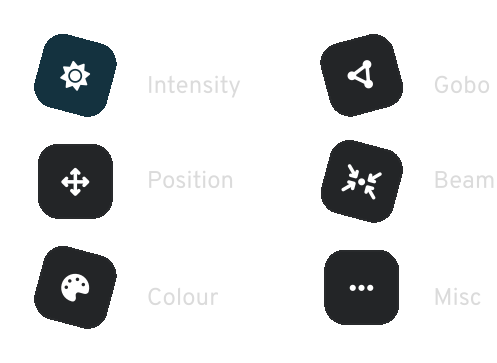
ATTRIBUTE MANAGER
A better way to edit and customize every fixture.
GDTF IMPORT
Import GDTF files directly into EMU and build your own GDTF library.
Step-by-set process:
Sign up to
gdtf-share.com
if you haven’t already.
Click on
Find Fixture
and find your fixture.
Underneath the Revision table, click on the
Download
icon, and go to EMU
Select
Path
and in
Channel View
GDTF Library
click on
Import GDTF
Happy importing!

Audio Input
Define unlimited custom trigger zones with the new equalizer UI, and let EMU keep time for you with automatic BPM detection.
Audio input in EMU
Lights using the Capture software
Quality Of Life (QOL)
Small improvements that add up.
Notifications
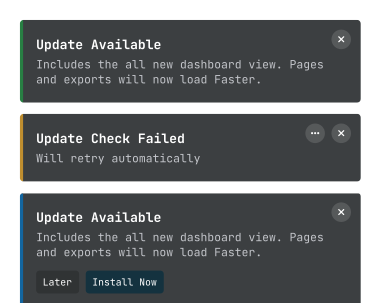
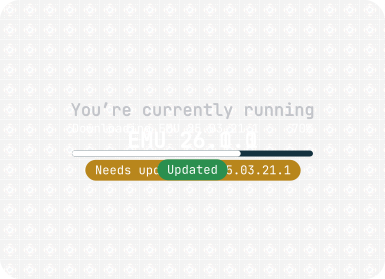
In-app updates
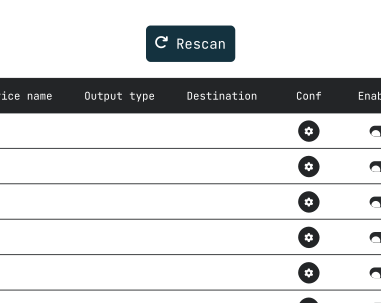
Automatic device discovery
Preview Releases
Incremental updates shipped between major releases.
Version 26.1012.1-preview
Improved
- The grid arranger now shows full-colour wiring-pattern tiles, so you can pick how your pixels are wired at a glance.
- Arranging fixtures as a grid now starts with a sensible default grid size.
- The selection box in LED Mapping now sits flush against the selected pixels.
- The selection box's corner and rotate handles are easier to grab, including near the edge of the canvas.
- Data direction arrows are now centred on each pixel and update live as you arrange, move, resize or rotate.
- The Updates tab is now fully translated in every supported language, including update messages, channel names and release notes headings.
- LED Mapping effect settings now show readable, translated names such as "Edge Smoothness".
Fixed
- Fixtures on the Main page now fill the available width before wrapping to the next row.
- Pressing a fader in a partly hidden row on the Main page no longer makes the fixture list jump.
- The Programs and Banks arrow buttons on the Main page now sit evenly together when EMU opens.
- On the Patch page, a fixture that starts at the end of a row and wraps onto the next row now still shows its name.
- The rotate handle on the selection box can now be clicked anywhere on its icon, not just the upper half.
- Dragging a handle past the edge of the canvas no longer interrupts the drag.
- An arrangement you resize, rotate or flip on the canvas now keeps its shape when you change its data direction, rotation, spacing, rows or columns, instead of snapping back.
- Importing a show now refuses files that try to write outside the show's folder.
- The progress bar on the Updates tab no longer jumps back towards 0% while an update downloads.
- The Updates tab now shows the version being downloaded instead of "{0}".
- Switching language now updates the Updates tab straight away.
- Tooltips and list headers that showed blank or placeholder text now show the right wording, including the Input tab, LED Mapping undo and redo, the Programs list, and the Audio, MIDI and VST automation lists.
Version 26.901.2-preview
New
- In MIDI Learn, select a program, group, knob or navigation button and press Delete or Backspace to remove its MIDI mapping.
Improved
- Free users can now browse and search the whole fixture library, with fixtures outside the Free tier shown locked instead of hidden.
- Recording a standalone show now tells you whether it is waiting for a source, waiting for a trigger, or counting frames, instead of sitting at zero.
- A DIN Pixie can now be patched to all four of its universes, instead of only one.
Fixed
- The Prev/Next Program and Bank buttons now respond to their MIDI mapping.
- A mapped knob or button keeps showing its MIDI mapping each time you reopen MIDI Learn.
- Knobs and buttons now clear their highlight once mapped, matching programs and groups.
- Mapping a knob or button no longer overwrites the mapping on the control you mapped just before it.
- Buttons and group toggles mapped to a knob or fader now trigger once per press instead of repeatedly as it moves.
- Free users now receive app updates instead of staying on the version they installed.
- The DIN Pixie settings pages now scroll, so every setting stays reachable on smaller windows.
- The progress bar now clears as soon as a standalone show operation finishes.
- Erasing a stored standalone show, or discarding a recording you have not uploaded, now asks first.
- Deleting a custom fixture, or removing one of its modes, now also removes any fixtures patched from it, instead of leaving them in the patch taking up channels.
- Fixture faders no longer occasionally drop back to zero a couple of seconds after you set them.
Version 26.731.2-preview
New
- Duplicating a fixture now copies its values and automation across every program, so copies arrive fully programmed instead of blank.
- Audio can now drive the master tempo: turn on the audio tempo clock in Audio settings and your tempo-synced oscillators lock to the beat of whatever's playing.
Improved
- The Speed knob now shows the live detected tempo while the audio tempo clock is driving it.
Fixed
- Rapidly triggering program changes from a MIDI controller no longer crashes EMU.
- Remote not properly saving the selected channel values on app close
- Free tier had a small chance to get output stuck at full for long running shows
Version 26.707.1-preview
Fixed
- MIDI tap tempo (CC 103) now registers every tap and sets the correct BPM, instead of ignoring taps from many controllers or reading a far-too-low tempo.
- Updating the fixture library database now works on all Macs, instead of failing with a permission error on some machines after restarting.
Version 26.702.3-preview
New
- Custom fixture channel modes (like 3-channel and 8-channel) are now managed in one editor — add, switch between, and remove modes from the new Modes strip.
Improved
- Audio device hotplug detection
- Fixture and device search fields now have a clear (✕) button to wipe your search in one click
- Custom fixture editor value-mapping controls no longer get cut off when adding mappings, with cleaner channel rows and delete icons
Fixed
- Certain audio devices would sometimes cause the app to freeze on startup
- Macro and control channels on custom fixtures can now be adjusted in the Attribute Manager, instead of appearing as greyed-out faders
- Custom fixture channels now start at the default value you set for them when the fixture is created, instead of starting at 0
- Custom and GDTF fixtures now show their channel mappings in the Fixture Information panel
Version 26.608.3-preview
Multi Canvas support for led mapping
New
- Each program can now run multiple canvases at once, letting you play several pieces of content simultaneously — add, rename, and switch between them from the new canvas tab bar on the mapping page.
Fixed
- macOS no longer crashes when the display goes to sleep without an external monitor connected.
- MIDI notes that trigger fixture channels now return to 0 when the note is released, instead of holding at 50%.
- 8-bit color now fades with the program's fade time when switching programs, instead of jumping straight to the new color.
- Oscillators now keep running smoothly when switching between programs that share the same oscillator, instead of stuttering or restarting.
Version 26.519.4-preview
Improved
- Running the same scene on multiple canvases or programs is now lighter on VRAM
Fixed
- On Intel Macs, EMU no longer hangs at startup before the main window appears.
- Internal mapping preview no longer freezes when opening an external display.
- Programs with no fade-in time now snap into place even when triggered mid-crossfade.
- Locked faders are now held in place against every input — drag, MIDI, presets, and automation can no longer move them while the lock is on.
- Fader lock and inversion are now saved per program and restored when you switch back.
- Fixtures with multiple RGB/RGBW pixels now save their position on the mapping page when moving between programs.
- Applying a color to multi-selected groups on the LED Mapping page now saves the color on every selected group.
- Right-click Delete now works on programs and banks.
Version 26.505.7-preview
Display Routing for external monitors, plus reliability improvements across show loading, fixture management, and platform updates.
New
- Display Routing
- Route the canvas scene to external monitors
- Individual preview resolution
- Choose between merged or single-canvas display modes
- Smooth crossfading between different mapping scenes
Fixed
- Mapping page no longer keeps highlighting previously-selected pixels after you deselect them.
- Output devices now appear correctly in Preferences → Outputs after opening older shows.
- Faders load with their assigned colors and fixture bindings.
- Fixture library now self-repairs if damaged, restoring from the built-in copy or downloading the latest version as needed.
- Art-Net and ESP device scan no longer fails when another DMX app is running or a previous scan is still finishing.
- On macOS, fixture colors and bindings now apply reliably across all editing scenarios.
- Rename is back in the fixture right-click menu
- Loading a show with overlapping DMX addresses now flags the conflict and keeps the largest fixture, instead of silently shuffling them.
- On macOS, the update channel now defaults correctly for Intel and Apple Silicon installs.
- Top-bar breadcrumb now collapses progressively as the window narrows, so the navigation tabs stay visible and clickable at any width.
Version 26.424.2-preview
Fixed
- Oscillators applied to mapping-page scene parameters now pulse symmetrically around the parameter's value.
- "Show list of devices at startup" toggle now takes effect.
- License activation now shows a specific error message when a voucher fails.
- An invalid voucher no longer replaces your active one.
- No more repeating "Update check failed" notifications when your channel has no builds.
- Update channel now defaults to match the installer you downloaded.
Version 26.420.5-preview
Reliability and polish across the Updates tab, saving, feedback, and first-launch dialogs.
Improved
- Renamed the "Beta" update channel to "Preview" throughout the app. Your current channel choice is kept automatically — nothing to do.
- Cleaner Updates tab — release notes now focus on New, Improved, and Fixed items, with no extra sections cluttering the view.
- Refreshed the legacy-install migration dialog with a cleaner layout and two clear choices: "Remind Me Later" and "Remove Old Version".
Fixed
- Ctrl+C in any text field no longer crashes EMU. Clipboard copy/paste works correctly throughout the app.
- Oscillators could lose their assigned faders after saving and reopening a show. Your mappings are now preserved across save and reload.
- Updates tab now shows only the release notes for your selected update channel. Previously entries from every channel were listed together.
- Feedback dialog's description field now starts at the top of the box as expected, rather than floating in the middle.
Download EMU
EMU_Download
"*"обозначает обязательные поля